- Home
- What’s new
- The same numbers on every screen
What's new · Thu 15 Oct
One number,every screen.
A consistency pass on iPhone and web. A player’s expected points now match wherever you see them, and a few lines that guessed now read your real data.
One projection everywhere
Home now reads the same gameweek projection as Ask, Pulse and the player sheet, so your captain shows the same expected points wherever you look. The Home call card also lists the chips you really have left, not a fixed line saying all are in hand.
- What you need
- iPhone app 4.1.7 or later · Web
- Where to tap
- Home → the call card. Compare with Pulse → Projections, or tap the player.
- Access
- Free
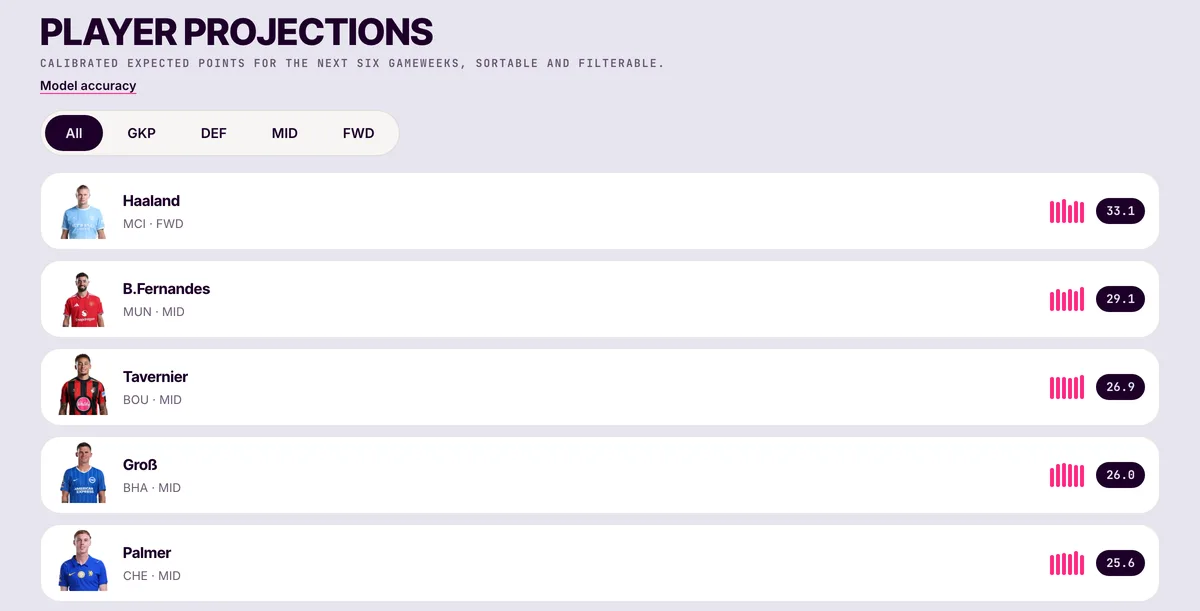
Photos for every player in Projections
Newer players in Pulse projections showed initials instead of a photo. Every row now has the player’s picture.
- What you need
- iPhone app 4.1.7 or later · Web
- Where to tap
- Pulse → Projections.
- Access
- Free
Confidence with a label
The confidence stamp on Results shows the score with what it means, such as 56/100 · Clear edge or 54/100 · Line ball, instead of a bare Low or High.
- What you need
- iPhone app 4.1.7 or later · Web
- Where to tap
- Results, under the headline.
- Access
- Free · in every analysis
Also shipped
Smaller things you will notice
- Honest pricing copyThe pricing and invite pages now describe only the plans and rewards you can actually get.
What should we build next?
Tell us what would make your gameweek easier. The founder reads every message, and the most-requested idea becomes the next post’s headline.
iPhone · Apple Watch · Web
Get every upgradethe week it ships.
Update to the latest FPLai on the App Store — the web app is always current at fplai.app.
