- Home
- What’s new
- Your first result stays on screen
What's new · Tue 13 Oct
Results first,plans after.
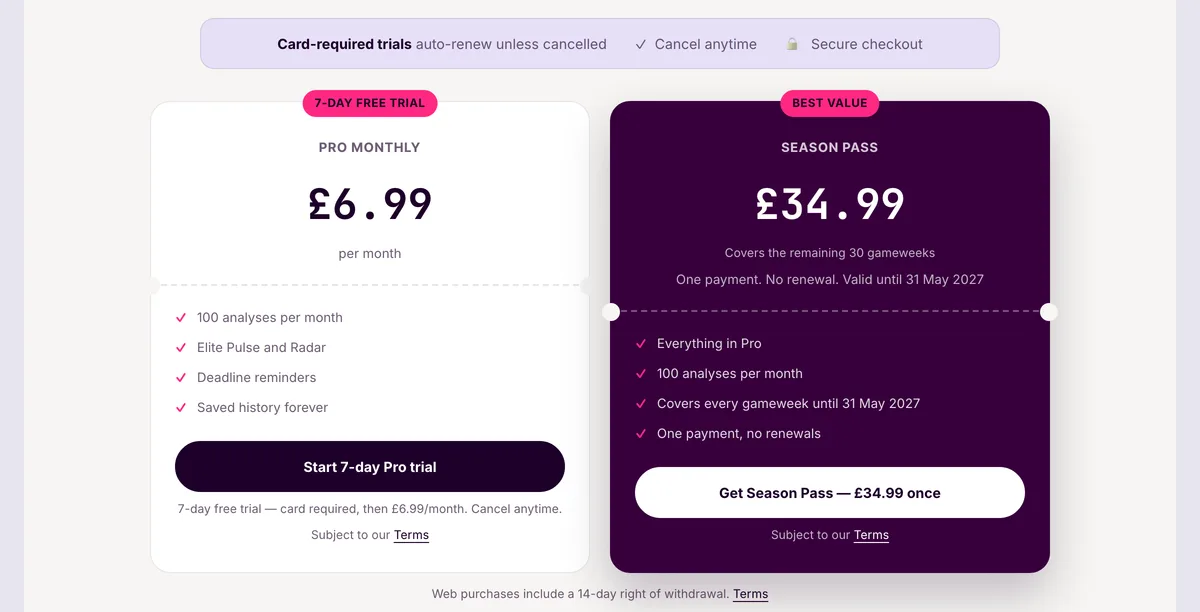
Finishing an analysis on iPhone now shows you the result, not a plans screen. When the App Store says you can have the free trial, Pro comes first. On iPhone and fplai.app, the Season Pass card says how many gameweeks it still covers.
Read your result before any plans
Finishing an analysis no longer opens the plans screen on top of your first result. The result stays readable with a See plans prompt in the page, and plans do not open by themselves again for the rest of that session.
- What you need
- iPhone app 4.1.7 or later · Web
- Where to tap
- iPhone: Analyze → Run analysis → Results. Tap “See plans” when you want them.
- Access
- Free
The free trial comes first when you can get it
If the App Store confirms you can have the free trial, the plans screen opens on Pro with a Start free trial button and the price after it. If you cannot, the Season Pass comes first as before, and Pro no longer promises a 7-day trial you would not get.
- What you need
- iPhone app 4.1.7 or later · Web
- Where to tap
- iPhone: “See plans” on Results, or the upgrade screen.
- Access
- Pro · free trial for eligible App Store accounts
The Season Pass shows the gameweeks it covers
The Season Pass card now says how many gameweeks of the season it still covers, on the iPhone plans screen and on the pricing page.
- What you need
- iPhone app 4.1.7 or later · Web
- Where to tap
- fplai.app/pricing → Season Pass card. iPhone: the plans screen.
- Access
- Season Pass
What should we build next?
Tell us what would make your gameweek easier. The founder reads every message, and the most-requested idea becomes the next post’s headline.
iPhone · Apple Watch · Web
Get every upgradethe week it ships.
Update to the latest FPLai on the App Store — the web app is always current at fplai.app.